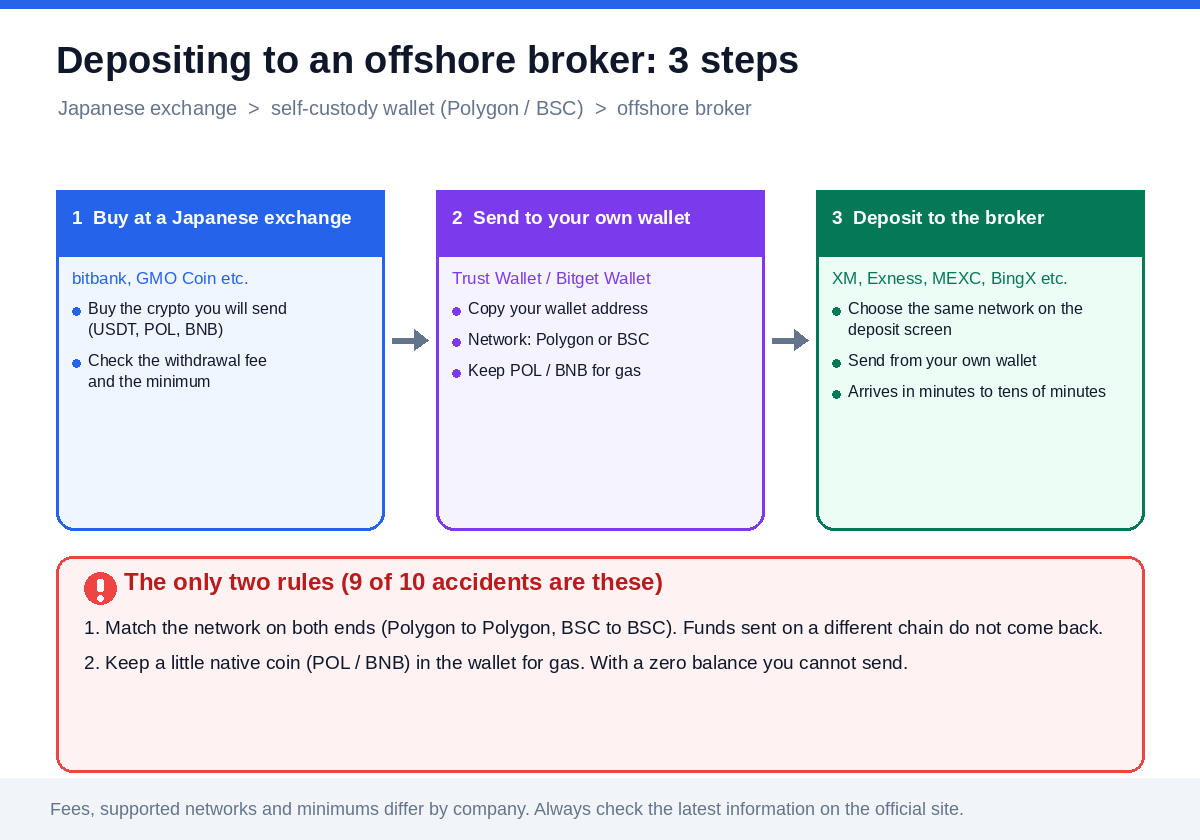
- A direct transfer from a Japanese exchange to an offshore broker is generally not possible: Under the travel rule the destination must be chosen from a registered list. You can send to a wallet you control, so the transfer goes through your wallet once.
- One wallet (Trust Wallet or Bitget Wallet), one chain (Polygon or BSC): Both wallets support both chains. The first priority is to match the network your broker accepts.
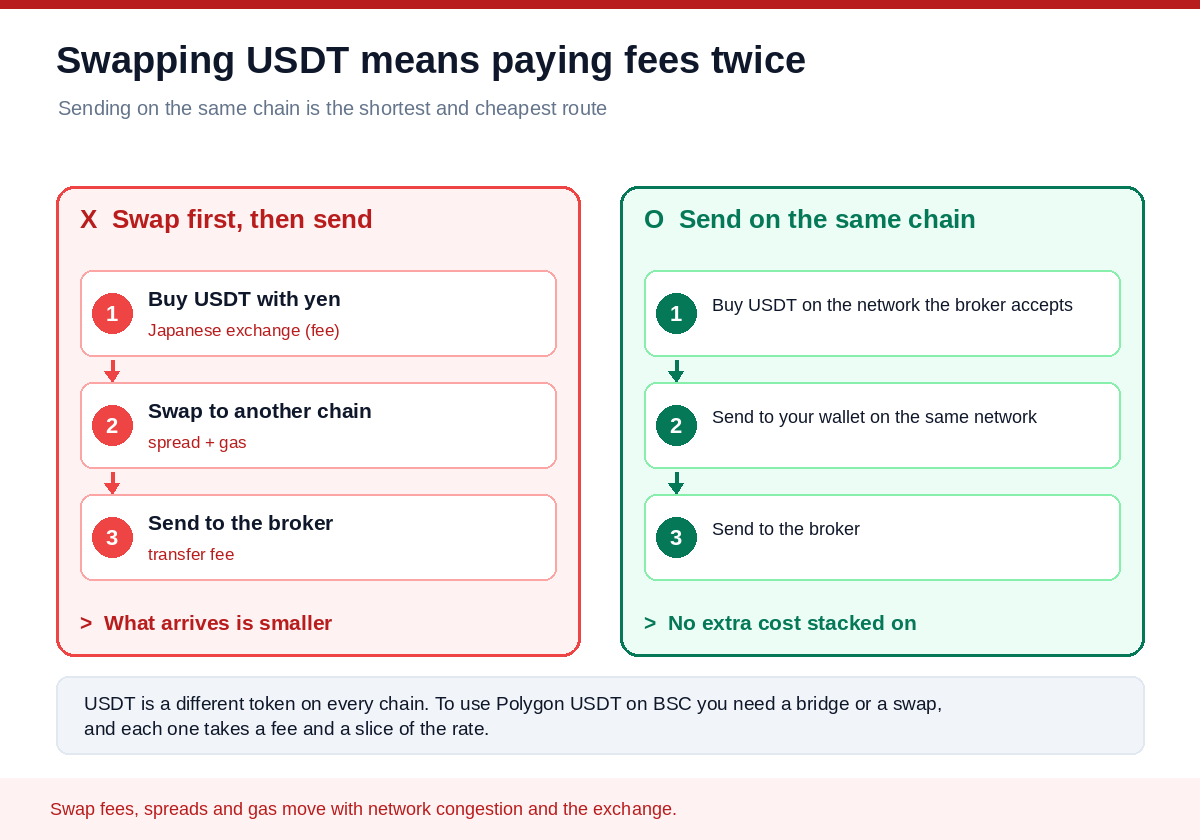
- Swapping into USDT means paying fees several times over: You pay a DEX fee, price impact and gas twice. If the broker accepts a no-deposit bonus or a direct deposit in yen, POL, BNB or USDC, skipping the swap is cheaper.
- Why a Japanese exchange cannot send directly (the travel rule)
- Just two wallets (Trust Wallet / Bitget Wallet)
- Two chains only: Polygon or BNB Smart Chain (BSC)
- The route: Japanese exchange, your wallet, offshore broker
- Why swapping into USDT loses you money every time
- Getting JPYC back into yen (the JPYC EX redemption steps)
- How people actually fail, and what to watch
- In depth: why to avoid TRC20, and how far a transfer can be traced
- FAQ
1. Why a Japanese exchange cannot send directly to an offshore broker
Try to send crypto from a Japanese exchange straight to an offshore exchange or broker and you may find the transfer screen will not go further, or the funds never arrive. The cause is the travel rule, a legal requirement in Japan since June 1, 2023.
The travel rule requires the sender and recipient information (who sent to whom) to be passed to the receiving business when crypto is transferred. To do that reporting, Japanese exchanges make you pick the destination from a pre-verified list (bitFlyer, Coincheck, bitbank and others), so you cannot send directly to an offshore operator that is not on that list. The number of jurisdictions the FSA designates as notifiable rose to 63 on August 3, 2026, and even for the same offshore operator, whether a given Japanese exchange allows it can differ depending on which country's entity it is treated as.
On the other hand, transfers to a wallet where you hold the private key yourself (a self-custody wallet such as Trust Wallet or Bitget Wallet) are outside the business-to-business reporting. So you can send from a Japanese exchange to your own wallet, and from there send on as you judge best. That is why the transfer goes through a wallet once.
2. Just two wallets: Trust Wallet and Bitget Wallet
There are many self-custody wallets, but this page covers only Trust Wallet and Bitget Wallet. Both work entirely in a phone app, support both Polygon and BNB Smart Chain, let you add custom tokens, and connect to outside services such as JPYC EX through WalletConnect. You do not need both: one of them, whichever you find easier, is enough.
| Trust Wallet | A self-custody wallet with a phone app and a browser extension. Its official description covers more than 100 blockchains (Ethereum, BNB Chain, Polygon, Avalanche, Solana and others). It supports WalletConnect and lets you add custom tokens by contract address. |
|---|---|
| Bitget Wallet | A self-custody wallet built around its phone app. Its official help says it supports more than 130 networks, and you can add a token by name or contract address under "Wallet" → "Token management". The mobile app supports WalletConnect. |
| Both of them | Both are wallets where you hold the private key. Write down the recovery phrase (about 12 words) shown when you create it on paper, never keep it in photos, the cloud or a notes app, and never tell anyone. Lose it and nobody can restore the wallet. |
3. Narrow the chain to Polygon or BNB Smart Chain (BSC)
There are many EVM (Ethereum-compatible) chains, but for a beginner Polygon and BNB Smart Chain (BSC/BEP20) are enough. The reason is simple: gas fees (network fees) are low and offshore exchanges and brokers are relatively likely to accept them for deposits.
| Ethereum mainnet | The most standard option, but gas tends to spike and fees weigh heavily on small deposits. Not recommended for beginners. |
|---|---|
| Polygon (POL) | Gas is usually a few yen to a few tens of yen. JPYC EX supports redemption here, which makes it a good fit if you plan to turn JPYC back into yen. |
| BNB Smart Chain (BNB/BEP20) | Gas is usually a few yen to a few tens of yen. Many offshore brokers accept USDT deposits over BEP20 (BEP-20), which makes it the practical choice if you use USDT. JPYC EX does not support it. |
Two rules a beginner must never break
- Keep the native coin for gas: POL on Polygon or BNB on BSC is needed as gas for every transfer. Convert everything into tokens and you cannot send at all (the same applies to redeeming JPYC).
- Match the network on both ends: Send over a different network and the assets do not arrive, and usually cannot be recovered (a "self-gox"). Check the network name on the send screen every time.
4. The route: Japanese exchange, wallet, offshore broker
Step 1: install one of Trust Wallet or Bitget Wallet and get a Polygon / BSC address
Install Trust Wallet or Bitget Wallet from the official site or the official app store and create a new wallet. Write the recovery phrase shown on paper.
Next, on the "Receive" screen switch the network to Polygon or BNB Smart Chain and check the address shown, which is yours. EVM chains share the same address format, so in Trust Wallet or Bitget Wallet one address works on both Polygon and BSC (balances are tracked separately per chain).
Step 2: buy POL / BNB (or the asset you will send) on a Japanese exchange and withdraw it to your wallet
Buy the asset you will use for gas and for the transfer on a Japanese exchange. Which asset can be withdrawn over which network differs by exchange, so always check the supported network on the exchange's withdrawal screen. Some exchanges do not handle POL (formerly MATIC) or BNB at all. Where that is the case, pick an asset and network that exchange can withdraw (for example XRP, ETH or USDC) and match it against what the broker accepts.
Register the wallet address you checked in Step 1 as the destination. Enter the address by copy and paste, never by hand. Choose "personal (private) wallet" as the destination type and complete the declarations.
Among FSA-registered crypto exchanges, only some handle BNB (bitbank, OKJ, Binance Japan, BitTrade, SBI VC Trade and others, based on the register as of November 2026). Large firms such as Coincheck, bitFlyer and GMO Coin do not offer BNB.
In other words, to use the BSC (BEP20) route, choose an exchange that both handles BNB and supports external withdrawals on BNB Smart Chain (BEP20) (for example, bitbank supports BNB Smart Chain for BNB withdrawals). POL is the same: each exchange fixes which network it supports (for example, bitbank supports the Polygon network for POL withdrawals). Before sending, confirm the network shown on the withdrawal screen matches the destination. Sending over an unsupported network may not be recoverable even by the exchange.
| bitbank | Handles both BNB and POL. BNB withdraws over BNB Smart Chain and POL over Polygon (official withdrawal pages as of November 2026). |
|---|---|
| OKJ / Binance Japan | Handles BNB. For external withdrawals, check whether BEP20 (BNB Smart Chain) can be selected on the withdrawal screen. |
| BitTrade / SBI VC Trade and others | Listed as handling BNB. Check each company's withdrawal page for the networks supported. |
| Coincheck / bitFlyer / GMO Coin | No BNB (POL is available). On these exchanges you cannot obtain BNB for the BSC route. |
Also, some exchanges process withdrawals on the next business day when a night or weekend intervenes, whereas these three accept external crypto withdrawals 24 hours a day, 365 days a year and process them in turn (stated in OKJ's and bitbank's official guidance). Late at night or on a holiday, you can move funds to a self-custody wallet without waiting for a window. Restrictions can still apply during maintenance, network congestion, additional AML checks (identity and transaction monitoring) or just after a security setting change, so always check the latest rules on each company's official site.
Step 3: check the supported chain on the broker's deposit screen, then send from your wallet
Choose "crypto" on the offshore broker's deposit screen and it shows the supported network and deposit address for each asset. Match the network shown there with the one selected in your wallet before sending. In the wallet, use "Send", enter the asset, network, destination address and amount, and confirm.
- Example 1: XM accepts crypto deposits in USDT, USDC, BTC, ETH, XRP, BNB and more, and for USDC it lists networks including BSC and Polygon alongside ERC-20 (deposit screen as of 2026).
- Example 2: Exness accepts USDT (TRC20, ERC20, BEP20) and USDC (ERC20, BEP20), among others (as of 2026).
- Example 3: Vantage accepts BTC, ETH, USDC (ERC20), USDT (ERC20, TRC20 and others) and XRP (as of 2026).
5. Why swapping into USDT tends to cost you money every time
The major Japanese crypto exchanges do not handle USDT, so many people assume that because the broker wants USDT they must swap into it inside the wallet. But a swap always costs something, and it does not end with one charge. If you can deposit the asset you already hold, that is the cheapest route.
| ① The DEX swap fee | About 0.01-1% per pool (around 0.05-0.3% in typical pools), plus price impact from thin liquidity (a worse effective rate) and slippage. |
|---|---|
| ② Gas twice | The first time you use a token, "approve" and "swap" are two separate transactions. Cheap on Polygon or BSC, but the charges add up. |
| ③ Once more when you send | Sending from your wallet to the broker costs gas too. Swap then send means around three fee events on the same money. |
| ④ The round trip on the rate | Buy in yen, swap into USDT, land in a dollar account at the broker: every change of currency loses a slice to the spread. |
When you can avoid the swap
- Yen bank transfer or card deposits are accepted: XM, Vantage, HFM and others take domestic bank transfers or cards directly, with no need to go through crypto.
- They accept POL / BNB / XRP / USDC directly: If the broker's deposit screen supports it, send that asset without swapping into USDT (XM, for example, accepts XRP, USDC and BNB).
- You can skip the deposit entirely: With XM's ¥13,000 account opening bonus, Vantage's ¥15,000, or the futures bonuses at MEXC and BingX, you can start trading with a bonus and no deposit at all: no deposit, no swap, no fees.
6. Getting JPYC back into yen (JPYC EX redemption)
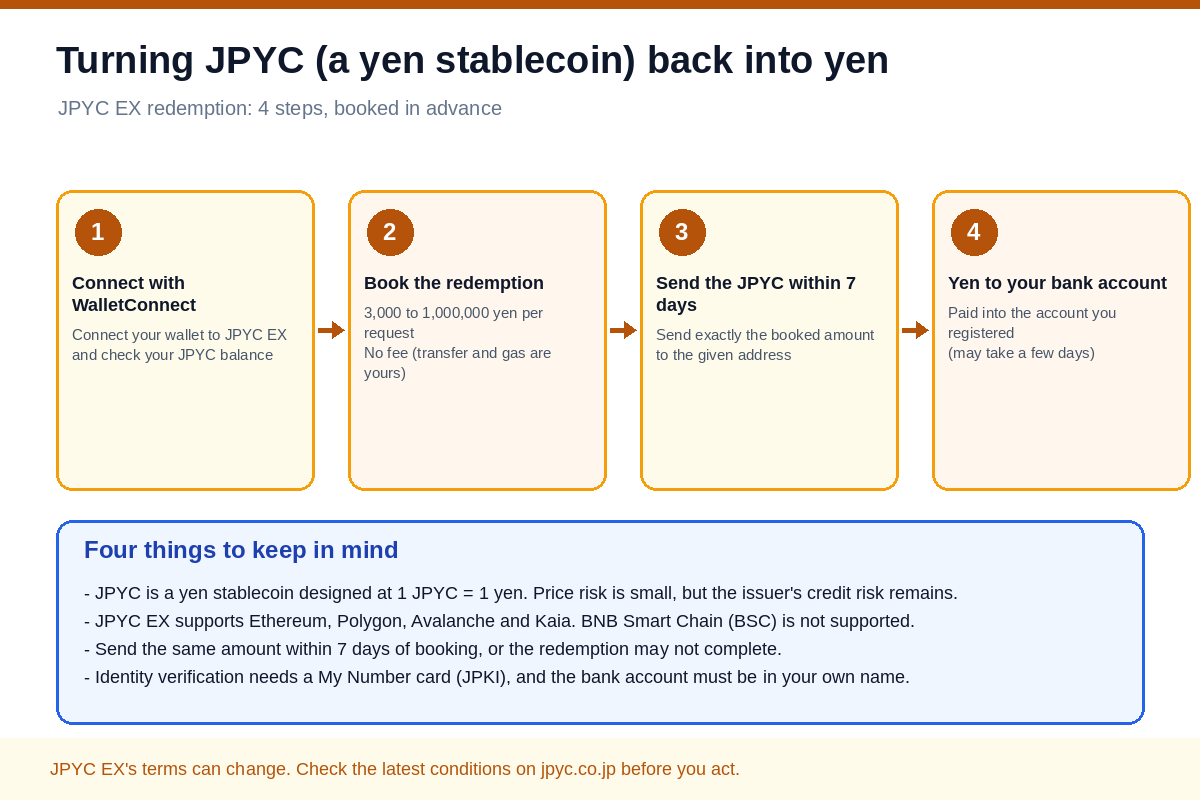
JPYC (JPY Coin) is a yen stablecoin issued by JPYC Inc. at 1 JPYC = ¥1. Redemption into yen happens through the company's official service JPYC EX (https://jpyc.co.jp/). The old "JPYC Prepaid" stopped issuing new tokens on June 1, 2025, and only the current funds-transfer-type JPYC can be redeemed.
Prerequisite: the wallet conditions for connecting to JPYC EX
JPYC EX requires the wallet you connect to have ① WalletConnect support, ② the ability to add custom tokens, and ③ support for a network JPYC EX accepts (Ethereum, Polygon, Avalanche C-Chain or Kaia). Trust Wallet and Bitget Wallet meet all three conditions (both support WalletConnect, let you add custom tokens and handle Polygon). Sign in to JPYC EX on your phone, choose "Connect wallet" → "WalletConnect" and connect Trust Wallet or Bitget Wallet.
Redemption basics (as of November 2026)
| Exchange rate | 1 JPYC = ¥1 |
|---|---|
| Fees | Free for both issuance and redemption (bank transfer fees and blockchain gas are yours to pay) |
| Amount | ¥3,000 to ¥1,000,000 per request (the same on all four chains). Anything above ¥1,000,000 is split across requests. |
| Supported chains | Four: Ethereum / Polygon / Avalanche C-Chain / Kaia (BNB Smart Chain is not supported) |
| What you need | Identity verification with a My Number card, a Japanese bank account in your own name, and registration of your sending wallet address (connected with WalletConnect) |
| Sending deadline | Within seven days of booking. After that the booking is cancelled automatically. |
| Block confirmations | Ethereum 32 / Polygon 256 / Avalanche 12 / Kaia 12 (on Polygon roughly 6-7 minutes) |
| Arrival | In principle immediately after acceptance. If transaction monitoring (AML/CFT) checks apply it can be the next business day or later. |
Redemption in five steps (Trust Wallet / Bitget Wallet)
-
① Sign in to JPYC EX, connect the wallet and register the address
Sign in to JPYC EX on your phone and choose "Connect wallet" → "WalletConnect". With Trust Wallet, connect through WalletConnect or the QR scanner inside the app; with Bitget Wallet, approve the connection in the wallet likewise. The connected address (your Polygon address) is registered with JPYC EX. Also complete My Number card verification and register a bank account in your own name.
-
② Get JPYC (issue it or receive it)
Book an issuance in JPYC EX and transfer yen to the designated account, and JPYC arrives at your registered address. If the JPYC does not show in your balance, add it as a custom token. The contract address is 0xE7C3D8C9a439feDe00D2600032D5dB0Be71C3c29 (the same on all four chains), symbol JPYC, 18 decimals. Never add a token you found by searching the name; always verify the address.
-
③ Book the redemption
In the menu, open "Redemption", enter an amount (3,000-1,000,000 JPYC) and book. Since a May 2026 change you no longer choose a network or sending address when booking; JPYC on any supported chain counts as long as it comes from your registered address.
-
④ Send exactly the booked amount to the destination address within seven days
Copy the address under "Destination details" on the booking confirmation and never type it by hand. The amount must match exactly, not off by a single unit (3,000.0001 JPYC will not satisfy a 3,000 JPYC booking). The sender must be your registered address. Sending from Polygon means keeping some POL for gas.
-
⑤ Once the blocks confirm, the yen reaches your bank account
In JPYC EX under "History", follow "Redemption received" → "Redemption paid out" and the yen is transferred to the account in your name you registered. If you are asked for further verification, log in to JPYC EX from your own bookmark rather than a link in an email, check the status and reply by the deadline.
And if you are working with JPYC, choosing Polygon lets you deposit to offshore brokers and redeem JPYC from the same wallet and address (JPYC EX does not support BSC).
7. How people actually fail, and what to watch
⚠️ Common failures
- Wrong network: Sending BEP20 to an ERC20 address, or BSC to a Polygon address. The funds may not arrive, and may not be recoverable.
- Out of gas: Converting all your POL or BNB into tokens so you can neither send nor redeem JPYC.
- Leaking the recovery phrase: Telling the 12 words to someone messaging you as "support" and losing everything.
- An expired deposit address: Some broker deposit addresses expire (about 15 minutes, for example) and funds sent later are not credited.
- Trying to redeem JPYC straight from an exchange: It is treated as an unregistered address and the redemption fails.
✅ Habits that prevent accidents
- Before sending, read the chain, address and amount aloud from the screen.
- Test with a small amount first (except JPYC redemption, which must match the booked quantity).
- Keep the recovery phrase on paper, never as digital data.
- Check the broker's supported assets and networks on its deposit screen every time.
- If fees matter, ask whether a no-deposit bonus could get you started before stacking swaps and transfers.
8. In depth: why avoid TRC20 (TRON) and recommend Polygon / BSC
This is not about steps but about why we choose these chains. Put simply, USDT on TRON (TRC20) is the stablecoin network under the heaviest monitoring and freezing pressure in the world right now. The chain itself is not the problem: it is where monitoring and freezing are most developed.
Why TRON-based USDT is screened so strictly
Tether, the issuer of USDT, holds the issuer's power to freeze USDT at a specific address. A frozen balance stays visible on the ledger but cannot move. There are published figures for how heavily that power is used.
- T3 Financial Crime Unit (T3 FCU): A public-private effort launched by Tether, TRON and TRM Labs in September 2024 can freeze assets within 24 hours of a law enforcement request. As of May 2026 it had frozen more than $450 million across cases in 23 jurisdictions on five continents, and says it stopped 43.9% more illicit funds in 2025 than the year before (Tether announcement, May 14, 2026; TRM Labs, May 19, 2026).
- A large issuer freeze: In April 2026, two addresses linked to Iran's central bank had about $344.2 million of USDT frozen, described in public records as the largest state-linked crypto reserve seizure from Iran (TRM Labs).
- Monitoring reorganised: The T3 FCU was wound up at the end of August 2026, and on November 12, 2026 a new unit by Tether, TRON and Chainalysis Digital Crime Task Force (DCTF) was reported to have launched (Cryptopolitan, November 13, 2026). Its purpose is to identify illicit USDT on TRON before it moves, so monitoring is tightening, not loosening.
In practice this means USDT arriving on TRON is more likely to be flagged by the KYT (transaction monitoring) of the exchange or broker receiving it. If a beginner routes through a DEX handling USDT of unknown origin, or through transfers to and from other people even once, the whole "dirty path" is assessed along with their own deposit, which leads to held funds or extra review. TRON is not dangerous in itself; it is the chain watched most closely, so there is no reason to go near it - that is the practical reason we narrow the choice to Polygon / BNB Smart Chain.
How far can a blockchain transfer be traced?
A blockchain is a ledger where every transaction is public. Enter a wallet address or transaction hash (TxID) into a block explorer (Polygonscan, BscScan, Tronscan and others) and anyone can see the date, the amount, the sending address and the receiving address. Your transfer, and the broker's deposit, cannot be hidden from a third party.
Moreover the analytics tools exchanges and payment firms use (Chainalysis KYT, TRM Labs and others) do not look only at the immediate sender. Chainalysis states officially that when assessing funds it "measures indirect exposure by tracing back as many hops as needed until it reaches an identified service". So even if the money went A to B to C to you, risk is calculated back several steps to its origin.
| What anyone can see on the public ledger | The date, the amount, the sending and receiving addresses, the TxID and the fee: anyone can check them in a block explorer. |
|---|---|
| What KYT tools look at | Not just the immediate sender but addresses several hops back, the services passed through (exchanges, OTC desks, payment firms) and past exposure to sanctions or crime. Chainalysis says it traces back until it reaches a service. |
| Is it decided by hop count alone? | No. TRM Labs says counting hops and cutting off at a number is not enough, and that the behaviour and attributes of intermediate addresses are assessed too. |
| How it works in 2026 | In Chainalysis's 2026 industry survey, monitoring direct exposure is already standard, and the question has moved to how strictly to treat indirect exposure from several hops back. Even at exchanges, indirect inflows of illicit funds commonly trigger alerts at around $100 in size. |
| How freezing works | Tether, the issuer, can freeze USDT address by address. A frozen balance stays visible but cannot move, and if your funds are in it, both transfers and redemption stop. |
That is why the single path from a Japanese exchange (verified funds of clear origin) to a Trust Wallet or Bitget Wallet only you use, and on to the offshore broker is the safest and smoothest route. Conversely, accepting USDT from others, mixing tokens of unknown origin through swaps, or routing through several wallets all add unnecessary risk score to your deposit.
If you want to start trading without a swap or a transfer, a no-deposit account opening bonus is the shortest route. Conditions and withdrawal rules are on each company's page.
* Terms can change. Check the latest information on the official website.
9. FAQ
Q. Can I send funds directly from a Japanese exchange to an offshore forex broker?
Q. Should I install both Trust Wallet and Bitget Wallet?
Q. Should I use Polygon or BNB Smart Chain?
Q. Is it cheaper to swap into USDT before depositing?
Q. How do I turn JPYC back into yen?
Q. Where can I get JPYC?
📘 Want the walkthrough with on-screen steps? (paid guide on note)
This page explains the mechanics and the route for free.
The paid guides on note walk through the actual screens in order: which field to fill and what to do when a transfer stalls, using redrawn screenshots. Each is JPY 1,000.
Both guides are written in Japanese. Network names, addresses and explorers are the same whatever the language.